
Resco Power Components includes multiple tree-based components that provide different ways to visualize hierarchical relationships between records. These components share a common JSON configuration, which defines how records are related.
|
Component |
Description |
|---|---|
|
Tree View |
Displays hierarchical data as a list with expandable nodes. |
|
Hierarchy Control |
Provides a graphical visualization of hierarchical relationships. |
|
Tree Lookup |
A dropdown (combobox) for selecting values from a hierarchical dataset. |
Hierarchy Structure and JSON Concept
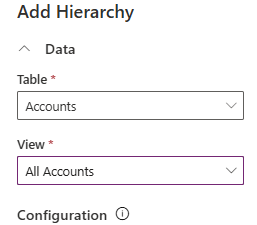
Each configuration starts by selecting a Table and View, which form Level 0 (dataset).
-
Level 0 is NOT part of the JSON, it is defined in the component's parameters.
-
The JSON only defines children and parents, referring to Level 0.
Note
It is important to remember that these components are used in the form to display related records. Therefore, Level 0 should be a child of the current record.
This configuration allows you to represent hierarchical data in two ways:
-
Structure for a single table (e.g., a recursive hierarchy where records are related to other records in the same table).
-
Structure for multiple tables (e.g., a hierarchy where different entities relate to each other).
JSON schema
JSON schema used in tree-based components:
{
    "$schema": "http://json-schema.org/draft-07/schema#",
    "type": "object",
    "properties": {
        "parents": {
            "type": "array",
            "items": { "$ref": "#/definitions/TreeLevelConfiguration" }
        },
        "child": { "$ref": "#/definitions/TreeLevelConfiguration" },
        "recursive": { "type": "string" }
    },
    "definitions": {
        "TreeLevelConfiguration": {
            "type": "object",
            "properties": {
                "property": { "type": "string" },
                "viewId": { "type": "string" },
                "parents": {
                    "type": "array",
                    "items": { "$ref": "#/definitions/TreeLevelConfiguration" }
                },
                "child": { "$ref": "#/definitions/TreeLevelConfiguration" },
                "recursive": { "type": "string" }
            },
            "required": ["property", "viewId"],
            "additionalProperties": false
        }
    },
    "additionalProperties": false
}
Single-table hierarchy
A single-table structure means records reference themselves using a lookup field.
{
  "recursive": "parentaccountid"
}
-
Accounts reference a parent account using parentaccountid. This creates a nested structure where accounts belong to other accounts.
Multi-table hierarchy
A multi-table hierarchy is defined by:
-
Children → Records under Level 0.
-
Parents → Records above Level 0.
Defining children
Each child must specify:
-
viewId - The GUID of the child's view.
-
property - The lookup linking the child to Level 0 or another child level.
Example Accounts → Contacts → Opportunities
{
  "child": {
    "viewId": "contact-view-id",
    "property": "parentcustomerid",
    "child": {
      "viewId": "opportunity-view-id",
      "property": "contactid"
    }
  }
}
-
Contacts (Level 1) link to Accounts (Level 0) via parentcustomerid.
-
Opportunities (Level 2) link to Contacts (Level 1) via contacted.
Defining parents
Each parent must specify:
-
viewId - The GUID of the parent's view.
-
property - The lookup in Level 0 that points to the parent.
Example Opportunities → Accounts → Organizations
{
  "parents": [
    {
      "viewId": "account-view-id",
      "property": "customerid",
      "parents": [
        {
          "viewId": "organization-view-id",
          "property": "parentorganizationid"
        }
      ]
    }
  ]
}
-
Opportunities (Level 0) reference Accounts (Level 1) via customerid.
-
Accounts (Level 1) reference Organizations (Level 2) via parentorganizationid.
Example Accounts → Contacts → Opportunities + Parent Organizations
{
  "parents": [
    {
      "viewId": "organization-view-id",
      "property": "parentorganizationid"
    }
  ],
  "child": {
    "viewId": "contact-view-id",
    "property": "parentcustomerid",
    "child": {
      "viewId": "opportunity-view-id",
      "property": "contactid"
    }
  }
}
Note
Note that each parent level can only be configured with another parent level, not a child level. Similarly, each child level can only be configured with another child level, not a parent level. However, every level can have recursion configured.
The viewId can be retrieved from the URL of the view. Navigate to Tables / Entity, click Views, click the desired view, and copy the view id from the end of the URL.