
|
wiki-link |
|---|
Resco MCP server connects your AI assistant directly to your Resco Mobile CRM project. Instead of describing what you want and hoping the AI guesses correctly, it gives the AI precise access to your real configuration — forms, views, workflows, sync filters, sync logs, Dataverse metadata, and JSBridge documentation — so it can understand, explain, and help you modify your app with confidence.
What's an MCP server anyway?
An MCP server, based on the Model Context Protocol, is a program that provides AI models (like LLMs) with secure, standardized access to external tools, data, and actions to extend their capabilities beyond their training data.
Who is it for?
-
Are you configuring or maintaining a Resco Mobile CRM project (forms, views, home screen, dashboards)?
-
Are you developing JavaScript Bridge solutions and need accurate API references?
-
Are you troubleshooting sync problems and want your AI to read and interpret the actual sync logs?
-
Do you want your AI to understand your exact project — its entities, fields, and relationships — instead of guessing?
How does it work?
Your AI assistant's knowledge is enhanced with:
-
Complete JSBridge API documentation — for accurate offline HTML/JS code generation
-
Your project's data model — entities, fields, types, and relationships from your live Dataverse organization
-
Your project's full configuration — forms, views, dashboards, home screen, calendars, maps, and route plans
-
Workflow logic — your actual workflow XML, explained and validated in plain English
-
Sync configuration and logs — what records sync to devices, and why sync sessions succeed or fail
-
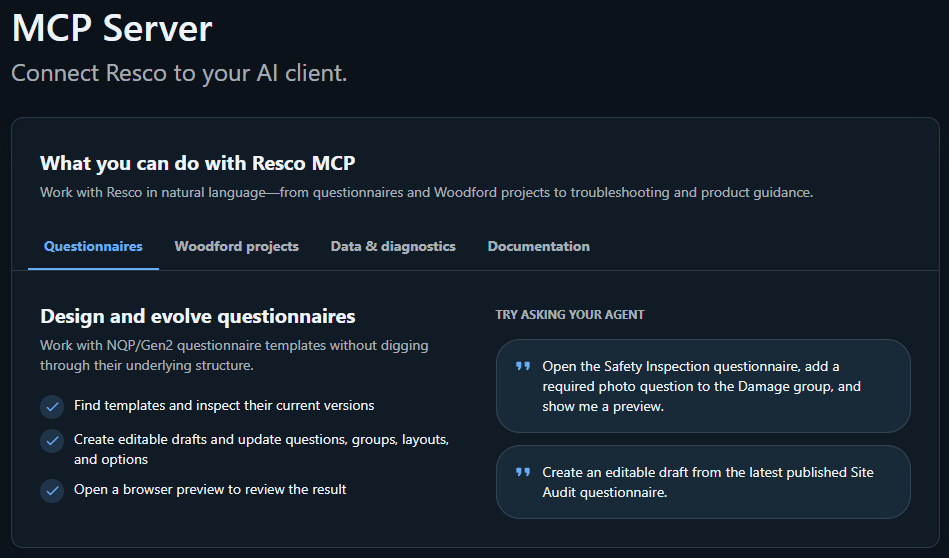
Questionnaire templates — defined in your Dynamics 365 organization
The AI doesn't guess — it reads your actual live configuration before answering.
Get started
-
Go to Resco Studio website (https://studio.resco.net/) and connect to your workplace using your Microsoft account.
-
Add the MCP server to your favorite AI tool, including GitHub Copilot, Claude Desktop, Cursor, or ChatGPT. The endpoint is https://mcp.studio.resco.net/mcp.
-
Start a conversation — the AI will have access to your project's live configuration and all the tools listed below.
Exact configuration steps vary by AI tool. Each tool has slightly different MCP configuration interfaces — see each tool's documentation for instructions on adding a custom MCP server.
Have you been using the old experience of Resco MCP server via Resco Agents (https://agent.resco.net/) with a different authentication mechanism (Bearer authentication)? Transition to Resco Studio; we will be shutting down this server in early October 2026.
Available tools
As of September 7, 2026, Resco MCP includes 84 tools (includes 4 session-init tools that must be called before their toolgroup, and 3 interactive selector/confirmation tools that open a UI rather than fetching data directly).
-
Authentication: Every tool runs over an authenticated MCP HTTP connection.
-
"Requires org?" —
Yesmeans the tool reads or writes your live Dynamics 365 / Dataverse / Resco Mobile project data (or an active session tied to it).Nomeans it works entirely from data you pass in or from bundled server-side content.Interactivemeans the tool opens a selector or confirmation UI rather than fetching or writing data directly.
Documentation
|
Tool |
Description |
Requires org? |
|---|---|---|
|
searchJsBridgeDocumentation |
Searches the bundled, version-controlled JSBridge API documentation for relevant functions, event handlers, and usage examples — useful when building or debugging offline HTML/JS customizations. |
No |
Connections & workspace selection
|
Tool |
Description |
Requires org? |
|---|---|---|
|
getAllConnections |
Lists the active Dataverse and Resco Cloud connections the signed-in user can access. Call this first — pass the returned id as |
Yes |
|
selectRescoWorkspace |
Opens an interactive Studio connection selector. Use scope |
Interactive |
|
selectQuestionnaireTemplate |
Opens an interactive selector for an authorized Studio connection and a specific existing questionnaire template. Call this before acting on an existing questionnaire; not needed when creating a new one. |
Interactive |
Workflows
|
Tool |
Description |
Requires org? |
|---|---|---|
|
workflowToolsInit |
Call this first before using any workflow tool. Returns the acknowledgement key ( |
No |
|
explainWorkflow |
Deterministically explains bounded raw Workflow XML you provide (e.g. copied from a form's OnLoad property) — branch-by-branch, in plain English. Does not need to connect to your org. |
No |
|
validateWorkflow |
Checks a workflow for a specific form or view event and reports structural errors and warnings without saving anything; can also validate hypothetical changes before they are applied. |
Yes |
|
getWorkflowEditorModel |
Returns a read-only, normalized workflow AST with JSON Pointer addresses for every node — use this to find exactly where a change belongs before calling |
Yes |
|
getFormWorkflows |
Reads and parses all workflow events (OnLoad, OnSave, OnChange, button commands, etc.) attached to a form, with a plain-English summary of each. |
Yes |
|
getViewWorkflows |
Reads and parses all workflow rules attached to a list view — row template selection, on-change/save rules, button and cell click rules. |
Yes |
|
initializeWorkflowEvent |
Initializes a workflow event on a form, view, calendar, or route plan target. Defaults to |
Yes |
|
clearWorkflowEvent |
Clears a workflow event from a form, view, calendar, or route plan target. Defaults to |
Yes |
|
mutateWorkflow |
Applies structural edits (add/remove/move branches, conditions, steps, if-blocks) to a workflow via an ordered list of operations. Defaults to |
Yes |
Forms
|
Tool |
Description |
Requires org? |
|---|---|---|
|
formToolsInit |
Call this first before using any form or list tool. Loads the Resco form/list architecture context into the session. |
No |
|
getFormStructure |
Parses a Resco entity form into its tabs, fields, settings, and active workflow events. |
Yes |
|
getFormFieldDetails |
Finds one field by schema name and returns its tab, position, style, and grid placement. |
Yes |
|
listFormFields |
Lists every field schema name on a form, globally and per tab. |
Yes |
|
createForm |
Creates a new form, optionally cloned from an existing one. Defaults to |
Yes |
|
addFormTab |
Adds a tab (detail, associated, iframe, or map) to a form. Defaults to |
Yes |
|
removeFormTab |
Removes a tab from a form. Defaults to |
Yes |
|
addFormField |
Adds a field to a form tab or grid. Defaults to |
Yes |
|
removeFormField |
Removes a field from a form. Defaults to |
Yes |
|
reorderFormField |
Repositions a field on a form, optionally moving it to a different tab or grid cell. Defaults to |
Yes |
|
addFormButton |
Adds a command button to a form tab. Defaults to |
Yes |
|
addFormSeparator |
Adds a visual separator to a form tab. Defaults to |
Yes |
|
addFormGrid |
Adds a layout grid to a form tab. Defaults to |
Yes |
Lists, views
|
Tool |
Description |
Requires org? |
|---|---|---|
|
getListStructure |
Parses a Resco entity list's structure and FetchXML configuration — columns, filters, joins, sort order, row templates, swipe actions. |
Yes |
|
getListColumns |
Returns the primary and linked (related-entity) columns shown in a list. |
Yes |
|
getListFilter |
Returns a list's filter, explained in plain English, plus the raw FetchXML condition tree. |
Yes |
|
createList |
Creates a new list, optionally cloned from an existing one. Defaults to |
Yes |
|
addListColumn |
Adds a column to a list. Defaults to |
Yes |
|
removeListColumn |
Removes a column from a list. Defaults to |
Yes |
|
updateListFilter |
Adds, replaces, or removes filter conditions on a list. Defaults to |
Yes |
|
updateListSort |
Sets a list's sort field and direction. Defaults to |
Yes |
|
updateListAllowedFields |
Sets which fields a list allows for user-driven filtering and sorting. Defaults to |
Yes |
Home screen and UI artifacts
|
Tool |
Description |
Requires org? |
|---|---|---|
|
getHomeScreen |
Reads the app home screen structure — every tile/shortcut, how they are grouped, and a summary count by type. |
Yes |
|
getDashboardStructure |
Parses a named dashboard's grid layout and tile bindings. |
Yes |
|
listDashboards |
Lists every dashboard with its grid size, tile count, and referenced entities. |
Yes |
|
getCalendarStructure |
Reads a calendar's entities, event coloring, business hours, view modes, and date range limits. |
Yes |
|
getMapStructure |
Reads a global map's plotted entities, view/coordinate fields, default center/zoom, and clustering settings. |
Yes |
|
getRoutePlanStructure |
Reads a route plan's activity entity, date fields, source views, scheduling settings, and active workflow events. |
Yes |
|
getTheme |
Reads the app's visual theme ( |
Yes |
|
getStyles |
Reads named style presets from |
Yes |
|
addHomeScreenGroup |
Adds a folder/group to the home screen. Defaults to |
Yes |
|
addHomeScreenItem |
Adds a tile (entity, dashboard, calendar, map, route plan, iframe, etc.) to the home screen. Defaults to |
Yes |
|
removeHomeScreenGroup |
Removes a home screen group. Defaults to |
Yes |
|
removeHomeScreenItem |
Removes a home screen tile. Defaults to |
Yes |
|
reorderHomeScreenItem |
Repositions a home screen tile, optionally into a different group. Defaults to |
Yes |
Dataverse metadata and statistics
|
Tool |
Description |
Requires org? |
|---|---|---|
|
listDataverseEntities |
Lists all tables in your Dataverse environment — not just the ones the Resco project uses. |
Yes |
|
getDataverseEntityDetails |
Returns detailed metadata for one Dataverse table: display name, primary key, ownership type, and optionally fields and related tables. |
Yes |
|
dataverse_get_record_counts |
Returns approximate record counts (24-hour snapshot) for up to 50 tables. |
Yes |
|
dataverse_get_table_stats |
Returns record count, metadata, indexes, and Dataverse Search indexing status for one table in a single call. |
Yes |
|
dataverse_get_search_statistics |
Returns Dataverse Search storage size and indexed document count for the org. |
Yes |
|
dataverse_get_search_status |
Returns whether Dataverse Search is enabled, lockbox/CMK status, and per-entity indexing status. |
Yes |
Project and configuration
|
Tool |
Description |
Requires org? |
|---|---|---|
|
listProjects |
Lists active root Resco Mobile CRM projects available in Dataverse. |
Yes |
|
getProject |
Returns one project's details — assigned roles, user type, sync priority, and optionally its entity manifest. |
Yes |
|
listConfigurationFiles |
Lists every configuration file in a project, grouped by entity and type, with file-level stats. |
Yes |
|
getEntityConfiguration |
Summarizes everything configured for one entity — tabs/fields per form, columns/filters per view, and charts. |
Yes |
|
getProjectOverview |
Generates a Markdown report of the whole project's configuration, including a breakdown of the top 10 most-configured entities. |
Yes |
|
listEnabledEntities |
Lists the entities switched on in the project's configuration — the subset the mobile app actually uses. |
Yes |
|
listEntityDetails |
Returns the enabled entity/field list enriched with Dataverse display names, descriptions, types, and requirement levels. |
Yes |
|
patchEntityConfig |
Patches entity, field, permission, conflict, and sync settings in |
Yes |
|
publishProject |
Opens a human-confirmation widget for publishing a project. Never starts publication itself. |
Interactive |
|
liveSession |
Starts or stops the signed-in user's live preview session for a project. |
Yes |
|
remoteConsoleLogs |
Reads temporary remote-device console logs from a six-character Resco Pulse slot. |
Yes |
Project files
|
Tool |
Description |
Requires org? |
|---|---|---|
|
listProjectFiles |
Lists deployed Offline HTML/JS/CSS files under the project's |
Yes |
|
getProjectFile |
Reads one deployed |
Yes |
|
initFileUpload |
Creates a one-time, 120-second ticket for a bounded raw project-file upload. |
Yes |
|
writeProjectFile |
Writes bounded UTF-8 or base64 content directly to a project file under |
Yes |
|
uploadOfflineHtmlFiles |
Opens an interactive, confirmed uploader for local Offline HTML files; file bytes bypass the model context. |
Interactive |
Sync filters
|
Tool |
Description |
Requires org? |
|---|---|---|
|
syncFilterToolsInit |
Call this first before using any sync filter tool. Loads sync filter architecture context. |
No |
|
listSyncFilters |
Lists every sync filter in the project's |
Yes |
|
getSyncFilter |
Returns the sync filter for one entity, plus optional entity-level sync settings. |
Yes |
Sync logs
|
Tool |
Description |
Requires org? |
|---|---|---|
|
syncLogToolsInit |
Call this first before using any sync log tool. Loads sync log format and analysis guidance. |
No |
|
fetchSyncLogs |
Lists recent sync sessions — user, timing, result, errors, device configuration summary. |
Yes |
|
getSyncLogDetail |
Returns the full sync log body (or just its Summary XML) for one session. |
Yes |
|
analyzeRawSyncLogs |
Runs bounded, deterministic query matching and severity analysis on sync-log text you provide directly. Does not read from your org. |
No |
Questionnaires
|
Tool |
Description |
Requires org? |
|---|---|---|
|
listQuestionnaireTemplates |
Lists the latest version and status of every questionnaire template in the selected connection. (Replaces the retired |
Yes |
|
getTemplate |
Returns one questionnaire template's full definition, including its decompressed JSON content. |
Yes |
|
createQuestionnaireTemplate |
Creates a new blank, editable questionnaire template. No Resco project required. |
Yes |
|
createQuestionnaireTemplateDraft |
Returns the selected Draft/Staged template, reuses an editable latest version, or creates a new Draft. |
Yes |
|
modifyQuestionnaireTemplate |
Atomically applies an ordered batch of edits (groups, questions, static components) to a template, then saves once. |
Yes |
|
createQuestionnairePreview |
Creates a one-hour browser preview link for one questionnaire record; the preview reflects saved changes live. |
Yes |
|
initQuestionnaireScriptUpload |
Creates a one-time, 120-second ticket for uploading raw customization JavaScript to a Draft/Staged template. |
Yes |
Quick reference: tools that work without org access
These 7 tools do not read from or write to your Dynamics 365 organization or Resco project — they work from data you provide or from bundled server content:
|
Tool |
What it works on |
|---|---|
|
|
Bundled JSBridge API documentation |
|
|
Raw Workflow XML string you provide |
|
|
Raw sync-log text you provide |
|
|
Bundled Resco form architecture knowledge |
|
|
Bundled Resco workflow architecture knowledge |
|
|
Bundled Resco sync filter architecture knowledge |
|
|
Bundled Resco sync log architecture knowledge |
Resco Public Test MCP
The Resco Public Test MCP provides AI tools with access to bundled Resco developer knowledge without requiring access to a customer organization. The public endpoint for Resco documentation tools, resources, and prompts without signing in is https://mcp.studio.resco.net/mcp/public.
Public tools
The MCP exposes a documentation search tool for Resco JSBridge.
It can be used to:
-
Search Resco JSBridge documentation
-
Explain JSBridge APIs and concepts
-
Find relevant code examples
-
Help build or troubleshoot JavaScript integrations
-
Work with topics such as:
-
MobileCRM.UI.EntityForm -
onSave/onChange -
FetchXml -
DynamicEntity -
Metadata -
form validation
-
custom HTML / React integrations
-
data access from Resco Mobile CRM
-
Limitations
The public MCP does not provide access to a customer's Resco environment or Dataverse organization.
It cannot currently:
-
List organizations
-
List or open Resco projects
-
Inspect project configuration
-
List enabled entities or tables
-
Read forms, views, or sync configuration from a real project
-
Modify or publish projects
-
Query customer Dataverse data
In short:
Public Test MCP = Resco/JSBridge knowledge for AI
Authenticated Resco Studio MCP = customer organization and real Resco project access