
Resco Mobile Platform, or simply the Resco platform, is a no-code toolkit for building responsive and resilient mobile business applications for Microsoft Power Platform, Dynamics 365, Dataverse, and Salesforce.

The toolkit provides a robust suite of tools that enables its users to build “data-model-driven” enterprise mobile applications rapidly. Mobile apps are configured using a tool called Woodford and displayed in the client application Resco Mobile CRM, which is available for Android, iOS, Windows, and web browsers.
The toolkit consists of three parts:
-
Resco Mobile CRM, a highly customizable mobile app with powerful built-in features.
-
App Configurator (Woodford) and other admin tools for building the application, managing users, and handling synchronization.
-
Manager modules that enhance the functionality of the mobile application.
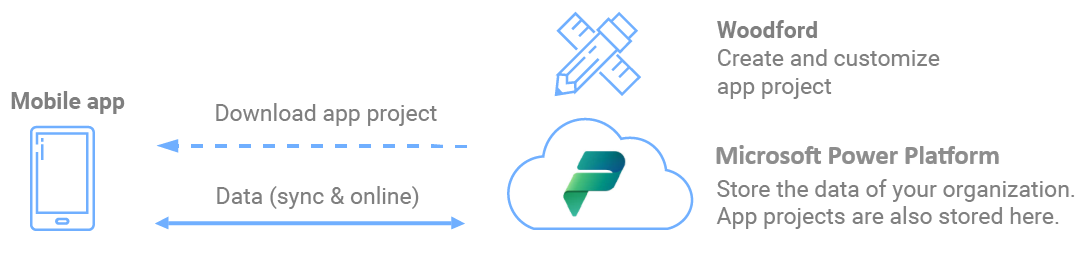
Getting started
For information about Salesforce, see Salesforce.
To get started with developing a mobile experience on Power Platform:
-
Install Resco Suite on your Power Platform.
-
Start the Resco Suite app.
-
In the Resco Suite app, start
Woodford
.
-
Create the data model used in the mobile apps. Select which tables and columns should be used.
-
Design the user interface: home screen, views and forms, and possibly other UI components.
-
Add components, such as questionnaires or guides.
-
Set up business logic: no-code rules that run in the mobile app.
-
Publish the app.
-
-
Continue on your mobile device.
-
Install Resco Mobile CRM | Download on your mobile device.
-
Start Resco Mobile CRM and sync with the organization using your Power Platform credentials.
-
Content tools
Resco offers additional web-based tools, usually aimed at system administrators and managers, that help them design and customize more functions or supervise and manage users, devices, or app projects.
- Automatic Dashboard
- Location Monitor
- Questionnaire Designer
- Report Designer
- Results Viewer
- Schedule Board
- Sync Dashboard
See also