
This page describes a function that has not yet been publicly released or has been released in beta/preview quality. Subject to change.
This optional sync feature allows you to define several complementary sync filters for a single entity. Each sub-filter identifies one self-contained set of records relevant to the user; the sync engine runs each branch as a separate fetch and combines the results.
The feature addresses situations where a single sync filter would be too complex, hit server-side link limits, or time out. The most common cases are entities whose records attach to many different entities.
The typical example are annotations. A single filter trying to express "notes attached to accounts I own, OR notes attached to contacts I own, OR notes attached to work orders assigned to me…" quickly exceeds the number of links the server can handle in one query. Common workaround was to download all active annotations and discard the unneeded ones in cleanup — wasteful.
Prerequisites
Requires Resco release 19.2. Both App Configurator and Resco Mobile CRM must be updated.
Setting up sub-filters
Multiple sub-filters are set up in App Configurator.
-
Edit an app project in App Configurator.
-
On the Project menu, select Settings > Synchronization.
-
Switch to the Multi Sync Filter Config tab.
-
Click Edit XML and enter the filter in the same format as is used in SyncFilter.xml.
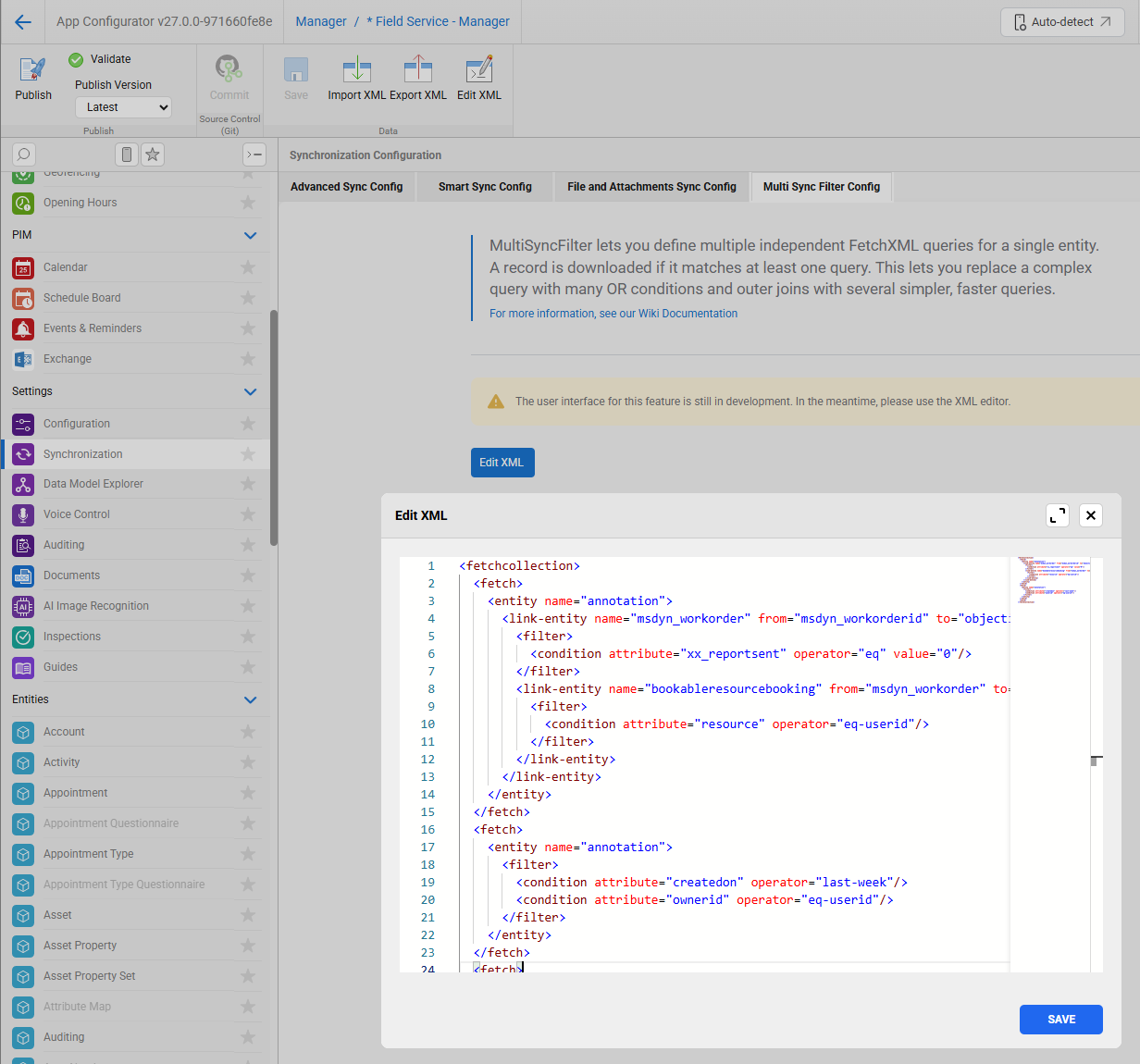
Additional information
-
All sub-filters are saved to the file MultiSyncFilter.xml. A valid XML file contains a collection of fetches. It uses the same structure and format as SyncFilter.xml.
-
The order of fetches is not prescribed (fetches of the same entity need not be grouped together), but individual sub-fetches will be executed in that order.
-
It is not recommended, but sub-fetches may return same record. (No need to be distinct.)
-
At least two sub-fetches need to be defined. If an entity has only one sub-filter in MultiSyncFilter.xml, it is ignored and the sync flow switches to standard SyncFilter.xml.
-
If you define multiple sub-filters for an entity, its traditional sync filter is ignored for downloads. However, the sync filter fetch is still used in cleanup phase.
Ineligible entities
For some entities, multiple sub-filters are not allowed:
-
Child and NN entities
-
Entities set up to use IncSyncWithSyncFilter or LinkedSyncFilters
-
Dataverse: activities
-
Dataverse: businessprocessflowinstance and list entities
-
Salesforce: contentdocument- or feed-related entities (sf_contentdocument, sf_contentversion, sf_contentdocumentlink, sf_feeditem, sf_feedlike, sf_feedattachment, sf_feedcomment)
-
Salesforce: knowledge articles (entities, whose names end with "__kav")
-
Salesforce entities with the flag DownloadAllLinkedSalesforceFiles
Sync filter vs multi sync filter
This is a snippet from the original SyncFilter.xml file with three conditions.
<fetchcollection>
    <fetch>
        <entity name="annotation">
            <filter type="or">
                <filter>
                    <condition attribute="xx_reportsent" operator="eq" value="0" entityname="WO2"/>
                    <condition attribute="resource" operator="eq-userid" entityname="BRB2"/>
                </filter>
                <filter>
                    <condition attribute="createdon" operator="last-week"/>
                    <condition attribute="ownerid" operator="eq-userid"/>
                </filter>
                <filter>
                    <condition attribute="xx_reportsent" operator="eq" value="0" entityname="WO1"/>
                    <condition attribute="resource" operator="eq-userid" entityname="BRB1"/>
                </filter>
            </filter>
            <link-entity name="msdyn_workorder" from="msdyn_workorderid" to="objectid" link-type="outer" alias="WO1">
                <link-entity name="bookableresourcebooking" from="msdyn_workorder" to="msdyn_workorderid" link-type="outer" alias="BRB1"/>
            </link-entity>
            <link-entity name="resco_questionnaire" from="resco_questionnaireid" to="objectid" link-type="outer">
                <link-entity name="msdyn_workorder" from="msdyn_workorderid" to="xx_workorderid" link-type="outer" alias="WO2">
                    <link-entity name="bookableresourcebooking" from="msdyn_workorder" to="msdyn_workorderid" link-type="outer" alias="BRB2"/>
                </link-entity>
            </link-entity>
        </entity>
    </fetch>
</fetchcollection>
In MultiSyncFilter.xml, the conditions are represented by three separate sub-fetches.
<fetchcollection>
	<fetch>
        <entity name="annotation">
            <link-entity name="msdyn_workorder" from="msdyn_workorderid" to="objectid">
                <filter>
                    <condition attribute="xx_reportsent" operator="eq" value="0"/>
                </filter>
                <link-entity name="bookableresourcebooking" from="msdyn_workorder" to="msdyn_workorderid">
                    <filter>
                        <condition attribute="resource" operator="eq-userid"/>
                    </filter>
                </link-entity>
            </link-entity>
        </entity>
    </fetch>
    <fetch>
        <entity name="annotation">
            <filter>
                <condition attribute="createdon" operator="last-week"/>
                <condition attribute="ownerid" operator="eq-userid"/>
            </filter>
        </entity>
    </fetch>
    <fetch>
        <entity name="annotation">
            <link-entity name="resco_questionnaire" from="resco_questionnaireid" to="objectid">
                <link-entity name="msdyn_workorder" from="msdyn_workorderid" to="xx_workorderid">
                    <filter>
                        <condition attribute="xx_reportsent" operator="eq" value="0"/>
                    </filter>
                    <link-entity name="bookableresourcebooking" from="msdyn_workorder" to="msdyn_workorderid">
                        <filter>
                            <condition attribute="resource" operator="eq-userid"/>
                        </filter>
                    </link-entity>
                </link-entity>
            </link-entity>
        </entity>
    </fetch>
</fetchcollection>
Verify the result in the sync log. Note the three Fetch entries.
15:33:37 annotation: 50784 recs, 89547ms, 1757ms/698K/page | Fetch1:28537 recs, 15203ms | Fetch2:15489 recs, 42719ms | Fetch3:6758 recs, 31125ms