
Warning
Work in progress! We are in the process of updating the information on this page. Subject to change.
The 19.2 / Fall 2026 release is planned for October 2026. Find the download links for the latest preview version on the Preview page.
Resco Forms
Extended forms sharing
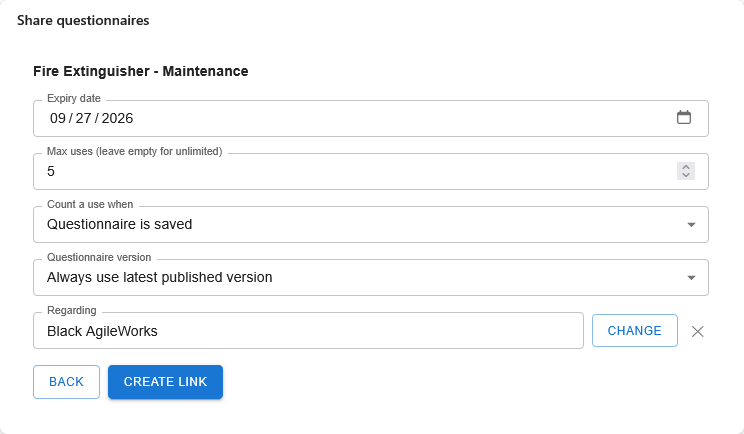
You can now distribute questionnaires to the wider public with the answers saved directly to Dataverse.
-
A Microsoft Power Platform/Dynamics 365 user generates a link with a questionnaire to fill out.
-
Deliver the link to your audience. Use email, instant messaging apps, or embed the link on a website...
-
The public user fills out the form (no login needed).
-
Collected data is saved to Dataverse.
See Extended forms sharing with public users for details.
Resco Forms: Gen 2 questionnaires for Salesforce
Salesforce-integrated customers can leverage our latest, most advanced data collection technology, Gen 2 questionnaires, including the new question components (rating and slider), table view for repeatable groups, templates adapting to screen sizes, and other Gen 2 features.
Gen 2 templates are stored in Salesforce. Mobile workers can open, fill in, save as draft, and complete the form. Photos, signatures, and files captured in the form are synchronized to the related Salesforce records.
Also, the process of generating reports from questionnaires is now simplified. When creating a blank report or a report “From Template”, app makers select a Salesforce form template, and its questions and bindings are loaded automatically. If the form contains an AutoReport, it is used as the initial layout.
Optimize forms to screen size
Questionnaires or forms were always designed with responsiveness in mind. The new automatic optimization mode for forms automatically restacks elements such as grids/tables and segmented buttons into a vertical layout when the content does not fit a small screen. Instead of shrinking input fields until they are unusable, the player keeps a minimum field width and adds smooth horizontal scrolling for the affected section. This applies on wide screens, and on small screens when Auto-optimization is turned off.
End users can switch off the automatic vertical layout with a button in the player and see the grid or table exactly as designed, with horizontal scrolling.
Advanced forms logic on Power Pages
Gen 2 forms embedded in Power Pages can now read Dataverse metadata and work with data in real time. Rules with fetches, lookups, data mapping, and custom JavaScript work the same way as in the Resco mobile app and Power Apps, including with tables other than Resco’s own.
Portal users can search, filter, and select records from authorized Dataverse tables directly in the form, see data from the parent record (e.g. Account or Work Order), and create related records on submission (e.g. a new Contact or Asset).
Data access follows the existing Power Pages table permissions and site settings, which are validated before the form opens.
Undo/redo when filling forms
Users can undo and redo their changes while filling in a Gen 2 form. Each step restores exactly the state the user saw before, including the resulting visibility, rule outcomes, and scores, and undoing the deletion of an image or media attachment brings it back.
Cascading lookups across question groups
Cascading lookups now work regardless of where the questions are placed in the Gen 2 template. A lookup can filter its options based on a selection in another lookup located in a different question group, in a repeatable group, or at the root level, not only within the same group.
In the designer, the “Edit Filter” menu of a lookup lists results from lookup questions anywhere in the template.
Regional formats for numbers and dates
Number and date fields in Gen 2 forms now follow the user’s regional settings: the device settings in the Resco mobile app and the personal settings in Power Apps. Users can enter numbers with a decimal comma and with digit grouping (e.g., 1 000,50 or 1.000,50), dates are shown and entered in the local format instead of the fixed MM/DD/YYYY, and validation accepts values that are correct for the user’s locale. Currency and time formatting are not part of this release.
Improved repeatable groups
A new “Always add to bottom” setting for repeatable groups controls where new instances appear. When enabled, every new instance is added at the end of the group (the Gen 1 behavior); when disabled, it is inserted next to the selected instance.
App makers can also customize the label of the “Add New” button, using {{label}} as a placeholder for the group name (e.g. “Add new Room”).
Single-group expand mode for Gen 2 forms
An expand mode for question groups lets users keep only one group open at a time. When a group is expanded, the previously open group collapses automatically, so the form behaves like an accordion.
Users choose the mode in User Settings (Options in the upper panel). "Default" lets any number of groups be expanded at once. "Single group" keeps only one group open at a time.
Resco Studio
Resco Studio (https://studio.resco.net/login) is a cloud-native, AI-first workspace, primarily for app builders. Use your favorite AI tool to help you build or troubleshoot your Resco solutions. Set up and manage novel Resco features.
-
Resco MCP server brings extra tools for faster and more effective AI-powered app development
-
Extended forms sharing with public users - distribute questionnaires to the wider public
Log in with your Google, Microsoft, or Salesforce identity, or a random email address. Connect to your Power Platform or Salesforce organization (org admin approved may be required).
The previously used Resco MCP server via Resco Agents is discontinued. Switch to Resco Studio using the endpoint https://mcp.studio.resco.net/mcp/public.
Resco Mobile Platform
New options for unlocking the app
App project administrators are now in control whether the Mobile CRM app should require a local app password, PIN, or nothing at all via the new App Security setting:
-
By default, password is required. Users must create and enter their own password. They can also optionally enable biometric login for convenience.
-
As a secondary option, administrators can choose that a PIN is required. In this case, user must create and enter their own PIN (at least 4 digits). They can also optionally enable biometric login for convenience.
-
When App Security is turned off, the user is not prompted to set up or enter any password or PIN. If the app becomes locked, the user must sign in with the server account to verify their identity instead of using a local app password or PIN.
Additionally, the biometric/system verification is now supported also on Microsoft Store version of Resco Mobile CRM, via the Windows Hello implementation.
Essential app project
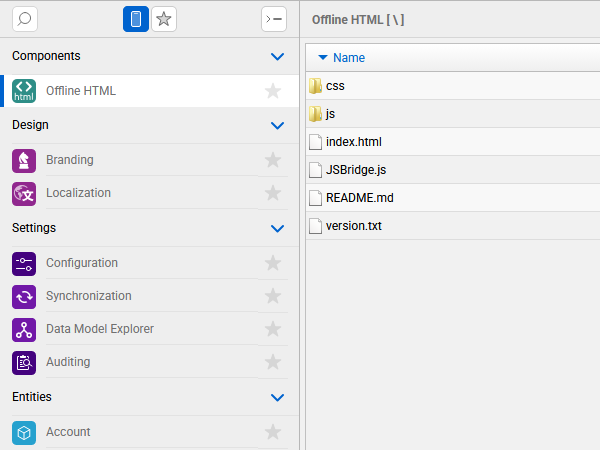
Woodford now offers a new app project type: "Resco Essential". Rather than using the standard building blocks of Resco apps, such as forms or views, you must develop the entire UI in JavaScript. You can continue to rely on the features that make Resco Mobile CRM exceptional, such as offline access, a powerful sync engine, or security. See Essential app projects for details.
Fill global constants from a table
Global constants introduced back in release 17.2 allow Woodford administrators to define project-specific constants. These can then be used in the business logic throughout the app project. Global constants are well-suited for partners who want to customize a single parent project for different customers.
In this release, Woodford admins no longer need to manually modify the constants. Woodford can automatically read values from a backend table. See How to fill global constants from a table for details.
Licenses
-
Woodford's Mobile users screen shows the updated license names (Standard => Enterprise, Inspections => Ultimate).
-
Woodford admins can now select a target license when designing app projects. The validation verifies that no elements out of scope of the license are included in the project.
-
A new license type, "Essential", is introduced. It targets users who don't want to use Resco's user interface elements, such as forms and views, in their project, but instead develop a custom UI using JavaScript.
Advanced searching and filtering in views
A completely redesigned filter screen on views lets mobile users build their own filter conditions directly in the app. Each condition is a card with Field, Operator and Value. Users can add or remove conditions, combine several of them (e.g. Region in X, Y, Z AND Due Date This Month), see a live “Result: X records” count, apply the filter, or save it as a private view.
Filtering is kept simple by default:
-
Only the fields displayed in the view and the most common operators are offered initially,
-
Show all fields and Show all operators reveal the complete set of options, including multi-value operators such as In / Not In.
The sorting dialog has also been redesigned. Ascending and Descending are clearly separated from the field list, and the fields visible on the view are offered first, with a “Show all fields” option.
In the App Configurator, the view designer is now also more intuitive.
-
“Select Fields” is renamed to “Enabled Fields”, “Edit Filter” to “View Filter” and “Edit Sort” to “Default Sort”, with reworked configuration dialogs.
-
Fields used on the view rows are now enabled by default, but app makers can still override the selection.
Control your app projects as distribution packages
App projects can now be exported as read-only “distribution packages”. When exporting a standard app project, the new “Export as distribution package” option marks the exported file as locked. Optionally, derivation from the project can be allowed (enabled by default), and a Custom Version ID can be set to identify the package (pre-filled with the project name and export timestamp if left empty).
Shen a distribution package is imported, it is automatically created as a standard project and cannot be edited. It gets a dedicated icon, and actions such as Edit, Export, Clone and all Git-related actions are disabled. Derive stays available only if the package allows derivation. Priority, Roles, Support Email and Custom Version ID can still be adjusted through the Properties dialog on the App Projects screen.
Export and import of distribution packages are also supported in Woodford CLI, so the process can be automated.
The app projects screen also gets a single, unified Publish button. It publishes immediately when a project has no children and opens the Publish All dialog when parent and child projects need to be selected.
Nicer XML format for rules
Business rules in exported (or Git-uploaded) form and view files are no longer stored as HTML-escaped XML collapsed into a single line. They are now stored as human-readable, indented, multi-line XML that can be reviewed in a standard text diff.
Better search in the tree view
In the tree view, it was possible to search for records, but only in the primary fields using the StartsWith operator. With this release, the standard search field configuration of each view used in the tree also applies for searching within the tree. For each view, you can define which fields to search and how.
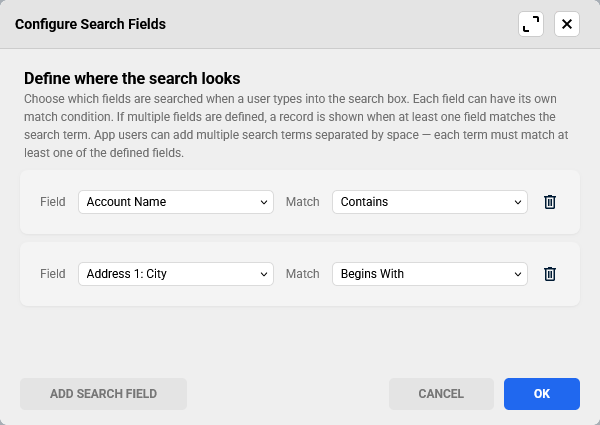
The search now combines quick local filtering of displayed data with a thorough database search for all eligible records. See the tree view for details.
Choose demo experience on first app launch
New users who download Resco Mobile CRM from the app stores and choose to try the demo can now select which demo scenario to explore (Field Sales or Field Service). The matching demo project and data are downloaded, replacing the single predefined demo project.
Live preview more reliable
We have improved the stability and reliability of the live preview feature in Resco Mobile CRM and App Configurator. For example, the live preview indicator no longer lingers after termination. Also, large forms now update much more reliably.
This fix was released in version 19.1.11.
Smoother sync when your session expires
Previously (up to version 19.1), when sync failed because of an expired session or authentication token, users received an error message and had to start sync again to log in. This became more common following Salesforce's recent tightening of token lifetime policies for connected apps.
To minimize disruption, starting with version 19.2, sync automatically displays an interactive login prompt and resumes on its own after successful authentication, so users no longer need to restart sync manually. This applies to both foreground and background sync.
Users have one minute to complete authentication. If they don't, sync is canceled, and they'll be asked to log in at the next sync, this time without a time limit. To extend the one-minute timeout, contact Resco support.
Exchange Web Services and Graph API
Microsoft announced that Exchange Web Services (EWS) is approaching end of service in Microsoft 365 and Exchange Online. Microsoft plans to disable EWS in October 2026 and a complete shutdown of EWS in 2027. See Microsoft blog for more details.
In this release, we introduce support of Graph API to replace EWS. Meanwhile, to make sure you don't lose access, consider setting EWSEnabled to "true" as detailed in the Microsoft blog.
OpenTelemetry (OTEL) for customers
New settings in App Configurator allow customers to send mobile app telemetry (sync metrics and application logs) to their own OpenTelemetry (OTLP) collector. Telemetry is sent to the customer's endpoint. Log sampling is now decided per app session (all-or-nothing within a session), which makes it predictable. In this phase, only HTTP protocol is supported.
To set this up, edit an app project in the App Configurator, go Configuration > Integration tab > Telemetry section.
Inherit user language from backend server
To ensure a smooth onboarding for app users, Woodford admins can now tell the app to inherit language from the user profile on the backend server. In Configuration > UI, enable Inherit user language from CRM backend. The app will attempt to use the exact language, or a compatible one (such as fr-BE > fr-FR). If such localization does not exist, the standard language is selected (the language of the device or en-US). Users can still override the default using Setup.
This feature is available for Microsoft Dynamics 365/Power Platform and Salesforce.
Romanian language
Resco Mobile CRM now supports Romanian (ro-RO) language out of the box. See the list of supported languages.
Salesforce
Wildcards support in Questionnaire Designer and Results Viewer
The wildcards in Salesforce blacklist/whitelist are now also respected by Salesforce Package (Questionnaire Designer and Results Viewer).
Salesforce Custom Metadata (__mdt)
Resco supports Salesforce custom metadata. Up to version 19.1, all custom metadata objects (with the suffix __mdt) were by default ignored during metadata import and therefore not visible in App Configurator unless they were explicitly whitelisted. App makers might have arrived at wrong conclusion that they are not supported. Starting with this release, custom metadata objects are imported by default and visible in App Configurator.
Territory Management support
Resco Mobile CRM can now sync records shared via Salesforce Territory Management (Accounts, Opportunities, Cases, Leads). The following needs to be done in App Configurator:
-
Go to Configuration > Offline Data Sync and enable Sync Shared with Salesforce Territory Management.
-
Enable the entities "Territory" (sf_territory2) and "User Territory Association" (sf_userterritory2association) in the app project.
-
The Sync Type of the entity "User Territory Association" must be set to "Always Full Sync". We recommend adding the condition "IsActive Equals Yes, AND User Id Equals Current User" to prevent unnecessary downloads in large organizations.
This feature becomes available starting 19.1.8 Client and 19.1.7 Server.
Master-detail relationship when syncing shared records
When synchronizing shared records on Salesforce, Resco Mobile CRM can now also sync child objects (master-detail relationship). It supports both out-of-box master-detail objects (e.g. Opportunity Product, Order Product, Timesheet Entry, ...) and custom objects. Multiple levels of detail objects are supported.
To use it, enable Sync shared records on both the parent entity and the child (detail) entity in the App Configurator. For custom master-detail objects, also turn on Parent Pointer on the lookup field that points from the child to its parent — for standard objects (Opportunity Product, Order Product, Timesheet Entry, etc.) this is set automatically. Once configured, sharing/unsharing a parent record automatically syncs its detail records too, through as many levels as the data model has.
See Shared records for details.
OAuth policy “Immediately expire refresh token”
Since version 19.2, Resco supports Salesforce’s refresh token policy “Immediately expire refresh token”. The token management in the mobile app was optimized to minimize number of times users are required to log in.