
The 19.1 / Summer 2026 release was released on June 8, 2026.
Microsoft Store app transition to WinUI
In this release, we are introducing a major update to the Microsoft Store version of Resco Mobile CRM for Windows. The first public preview was released on March 30, 2026.
Microsoft officially deprecated Universal Windows Platform (UWP) in 2021. While we have continued to maintain the UWP-based Microsoft Store version of Resco Mobile CRM, ongoing development has become increasingly difficult as some underlying components are no longer receiving security updates. To ensure long-term stability, security, and compatibility with modern Windows technologies, the Microsoft Store version of Resco Mobile CRM will transition from UWP to a new WinUI-based application.
What does this mean for Microsoft Store users?
-
The current UWP application will be seamlessly replaced by the new WinUI version via the Microsoft Store.
-
The new app will continue to provide the same core functionality while enabling future improvements built on modern Windows frameworks.
-
No manual action will be required for most users.
-
For users with Microsoft Dataverse/Dynamics/Power Platform that connect using the MSAL mode, we strongly advise to synchronize their app after the upgrade. Synchronization requires user to sign in once more. Without synchronizing, the data might be unavailable in online mode.
WebView changes
|
Important |
The new WinUI application will support Microsoft Edge WebView2 only. We have announced the deprecation back in 2024. |
As a result:
-
Legacy WebView will no longer be supported in the Microsoft Store version.
-
Customers using custom business logic or components optimized for the legacy WebView should migrate to WebView2.
How do you check if you are using the legacy WebView?
-
Edit the app project in Woodford, go to Configuration | Windows, and search for "edge".
-
If Use Edge WebView2 is set to "True", you are not impacted.

The transition from UWP to WinUI (and the related transition from legacy Edge WebView to modern WebView2) does not affect the app's native UI or its synchronization or communication with the server.
The only impact it might have on custom offline HTML components and hidden iframes included in your customization. As WebView2 is a (huge) superset of WebView (which was based on the ancient Edge v8 engine), we do not expect any missing functionality. However, we can't guarantee that the behavior of your JavaScript code will be exactly the same after the transition. For example, security policies like CORS are a lot stricter. We have done all steps from our side to ensure full compatibility of the JavaScript Bridge with both browsers. The only requirement is using JSBridge version 16 or later.
The only known advantage of the old WebView is that, being very small, it has much lower loading times. Therefore, we recommend identifying the places where multiple iframes (visible or hidden) are loaded and verifying that the overall performance isn't affected. If you observe any performance issues, please contact us with details, and our development team can prepare recommendations to reduce the performance impact.
Temporary fallback option
For organizations that require additional time to migrate:
-
We can provide a legacy Windows Store UWP version that still supports the legacy WebView.
-
This version will receive limited updates and no access to new features after release 19.1 and is intended as a temporary transition solution.
We strongly recommend performing the migration to WebView2 to ensure full compatibility with future releases of Resco Mobile CRM.
To switch to the legacy UWP app, all users have to
-
Synchronize their Resco Mobile CRM app to make sure all local changes are uploaded to the backend server.
-
Uninstall Resco Mobile CRM.
-
Install Resco Mobile CRM Legacy.
-
Perform the initial synchronization.
A similar switch will be necessary if you later modify your business logic and want to return to the standard Microsoft Store app.
Delay update, stay with 19.0 app
-
Mobile app users can pause Microsoft Store updates for up to 5 weeks.
-
If your organization has managed devices, your administration probably has additional options to delay or disable updates.
Resco MCP server
Resco MCP server is the bridge between your Dataverse organization, Resco app projects, and your favorite AI tool. The AI sees your data structure, understands how Resco apps work, and applies the changes—add a field, set up sync rules, or customize workflows just by asking.
What you can do:
-
Vibe-code a business app that runs in a proven, secure, and high-performance native envelope — no SDKs, no app store headaches.
-
Enrich Resco Mobile CRM with custom JavaScript components that feel native and work offline.
-
Supercharge questionnaires with advanced JavaScript logic — dynamic, data-driven, and field-ready.
-
Configure the native UI of Resco Mobile CRM by chatting with the AI — tailor every screen, command, and workflow to your users.
-
Analyze sync logs & fine-tune sync filters to squeeze every bit of performance out of your mobile deployment.
Read more on the wiki or head straight into action.
New questionnaires
We have introduced multiple new features for the Modernized Questionnaire Player (gen 2).
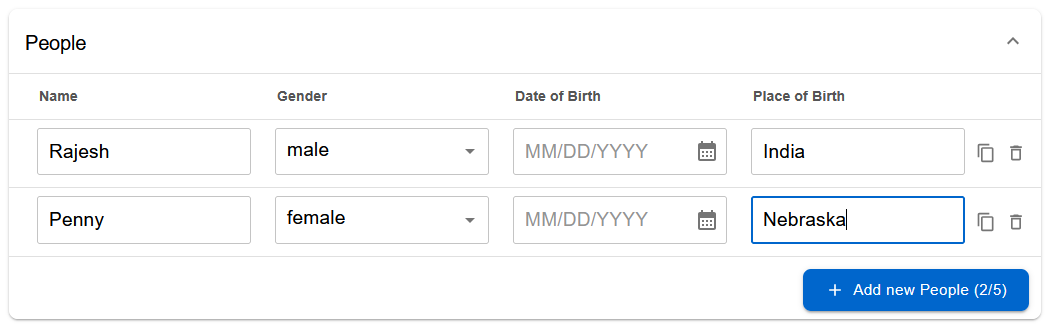
Table view
You can now display question groups as tables. This function is available for second-generation questionnaires only.
Barcode scanning
The second generation of questionnaires now supports barcodes. In Gen 2, barcode is no longer a standalone question type; it can now be enabled for questions of the types Text, Number, URL, Email, and Lookup. For the Lookup question, you can also set up the field where the barcode string should be found.
Barcodes are not supported in web browsers, e.g., on Power Pages.
Preview questionnaire templates
People who design new questionnaire templates can now do it much faster, thanks to the new preview feature directly in the designer. The preview includes support for smart rules (such as showing/hiding a question based on an answer).
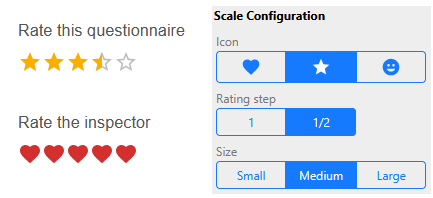
Rating question
The question type: Rating. Use visual icons such as stars or hearts to rate. You can set up the icon, its size, and rating step.
Slider view for Number question
We are introducing a new "Slider" view option for Number questions (both whole and decimal numbers). Instead of typing a number into a text box or scrolling through a long dropdown list, users can now select a value by dragging a handle along a horizontal track. Designers can configure the minimum and maximum range, step increments, and the starting position of the slider.

Cover card (TOC/logo customization)
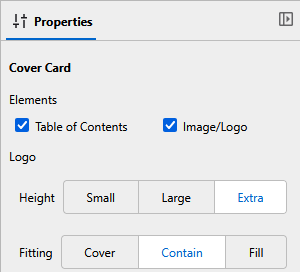
You have more control over the "cover card" of your questionnaire. It has the following components:
-
Title
-
Optional icon and description
-
Image or logo: optional configurable: set how large (tall) the logo should be and how it should fit into the dedicated space.
-
Table of contents: you can now disable TOC if it doesn't fit your template.
Power Pages: getQuestionnaireIdByTemplateName function
getQuestionnaireIdByTemplateName(templateName: string, []?: ["published", "draft", "staged", ...]
We're introducing a new way to access templates in Power Pages. This function retrieves the latest published version of a template.
-
As the first parameter, use the template name.
-
The second optional parameter overrides the published statuscode of the searched questionnaire.
On the page with the latest Questionnaire Player component, the function can be accessed like this:
const questionnaireId =
   await window.Resco.Questionnaires
       .getQuestionnaireIdByTemplateName("My Template", ["published", "draft"]);
Dynamic lookup filtering
We have enabled dynamic filtering between Lookup questions (also known as cascading lookups). Questionnaire designers can now configure a Lookup question to filter its available options based on the selection made in a previous Lookup question. For example, if the first question asks a user to select a specific "Account" (company), the second question can be configured to display only "Contacts" linked to that exact Account.
More flexible validation
The player no longer treats incomplete questionnaires as invalid. Users can now save in-progress questionnaires even if business rules validation fails. Some answers still block saving, e.g., entering text into a number question.
|
Error type |
Blocks save |
Blocks complete |
|---|---|---|
|
Parse error |
Yes |
Yes |
|
Technical limit |
Yes |
Yes |
|
Required field |
No |
Yes |
|
Business rule |
No |
Yes |
See Improved validation for details.
Mobile reports: special visibility behavior for the first page
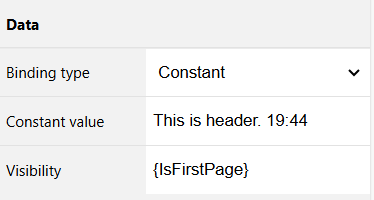
A frequent use case when designing a multi-page document: hide the header and footer on the first page. We are now bringing this feature to mobile reports. For any cell on your report, you can now use a special built-in variable {IsFirstPage} in the Visibility property. It returns "true" only on the first page.
Important: This feature is only available for PDF reports; for other formats, IsFirstPage is always true.
Headsup: Exchange Web Services end of service
Microsoft announced that Exchange Web Services (EWS) is approaching end of service in Microsoft 365 and Exchange Online. Microsoft plans to disable EWS in October 2026 and a complete shutdown of EWS in 2027. See Microsoft blog for more details.
Resco will provide a replacement API access to Exchange later this year. Meanwhile, to make sure you don't lose access, consider setting EWSEnabled to "true" as detailed in the Microsoft blog.
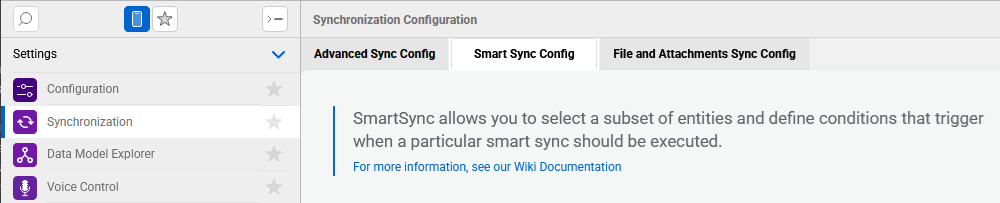
SmartSync
SmartSync allows administrators to set up smart synchronization profiles that target only specific entities, enabling partial synchronization of specific data subsets rather than full incremental syncs. In other words, this feature enables mobile users to quickly refresh only the data they need (such as bookings, work orders, or accounts) via automatic triggers, commands, or via JavaScript.
See SmartSync for more information.
New "Synchronization" item in Woodford
We have added a new item to the Project menu in Woodford. When editing app projects, Woodford admins can go to the new Synchronization item to access the following features:
-
SmartSync - new feature for this release
-
Advanced sync setup - new visual configuration tool rather than direct XML editing; moved here from Configuration
-
Document filters - new visual configuration tool rather than direct XML editing; moved here from Configuration
Forms: Pages system
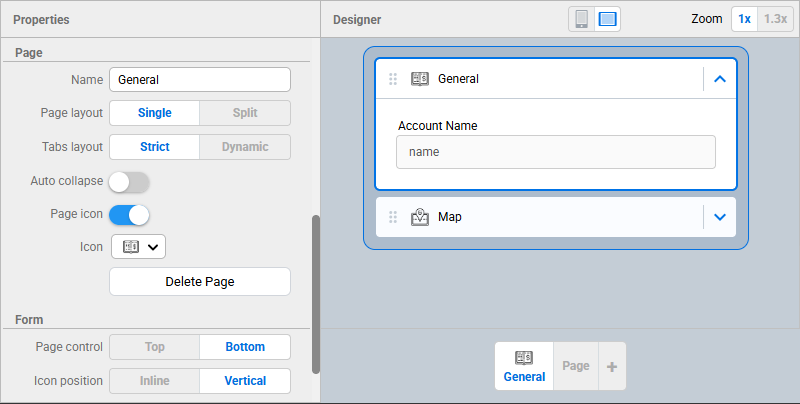
The new Pages system on forms allows Woodford administrators to organize the form tabs into meaningful pages - grouping the tabs by logic, semantics, workflows & app maker preference. The Pages system completely replaces the legacy, non-flexible form layout, where only a single tab could be configured per navigation item on a form. From now on, it is possible to create meaningful user navigation on forms by utilizing pages with as many tabs as the administrator desires. Pages load data when users activate them. Therefore, form load times may improve dramatically by moving less important data (such as some associated lists) to separate pages.
Improved OCR flow
The user experience for using OCR on forms has changed. Once the text on an image is recognized, you can assign the text blocks to form fields one by one, without having to reopen the image.
Live preview enhancements
A few months ago, we introduced live preview for forms and views, allowing Woodford designers to see all changes to these components immediately in the app, dramatically improving the designer experience. In this release, live preview is also enabled for calendar, dashboard, scheduler, map, and route plan components.
Salesforce updates
This release grants the admin much finer control over the integration between Resco and Salesforce, delivering dramatic performance improvements for Woodford users, particularly for enterprise-scale organizations.
Faster initial connecting between Salesforce and Resco
When a Salesforce admin tries Resco in enterprise organizations with a large number of users, profiles, and roles, the initial connection can take a significant amount of time as Resco downloads security information. To speed up the initial enrolment, only the current user's security details are now imported. The admin can start experimenting with Resco much faster.
The standard Update Metadata function of Woodford will continue to retrieve the necessary security details for all users. (Or you can use the feature described below to blacklist Roles, Profiles, and Users.)
Faster metadata update
The Update Metadata function in Woodford for Salesforce is much faster for organizations with a large number of profiles, roles, and users. This is because instead of deleting and re-importing the entire set of users, roles, and privileges, Resco now calculates and applies only the differences between the state on Salesforce and Resco Cloud.
Finer control with Salesforce blacklist/whitelist
When Resco is connected to a Salesforce organization, it mirrors the Salesforce organization's security settings by default, so that Woodford and other tools can use this information for auditing, licensing, and targeting the audience for customizations (app projects). Connecting to enterprise-scale organizations with complex security settings requires importing thousands of profiles, roles, and permissions, resulting in a large security data footprint on Resco Cloud servers. This often leads to a significant slowdown in regular operations, such as metadata updates, publishing app projects, or license assignments. In reality, only a very small subset of security configurations is usually needed in mobile scenarios. Normally, only field users are relevant, meaning that only users belonging to a few profiles ever interact with Resco.
In this release, we're expanding the feature to Roles, Profiles, and, by extension, to users. The "Resco Metadata Sync Config" supports two additional options for the Type field: "Profile" and "Role". Both act as a whitelist, and allow either Name or ID. If there are no entries in the table, Update Metadata will import all profiles/roles. If there is at least one profile/role configured, only the whitelisted items are imported; the rest is ignored.
You can use Profile/Role whitelisting to limit which users are synced with Resco. Add a Sync Config line with the directive "@@FilterUsers", and add it as "Profile" or "Role" sync type (or both), depending if you want to filter users based on Profile or Role (or both).
See Salesforce object blacklist for details. This feature was released in bugfix 19.0.6.
Updated object blacklist
The list of objects blocked by default has been expanded. See Salesforce object blacklist for the updated list. This feature was released in bugfix 19.0.6.
Wildcards in object blacklist
You can now block objects more effectively by combining a prefix and the asterisk wildcard, e.g., !trailheadapp__*. See Salesforce object blacklist | Wildcard in object blacklist for more details.
Nested fetch links in Salesforce
Out of the box, Salesforce does not support sync filters over multiple nested links. SOQL supports only one level of nesting for inner selects. This may have implications in field service scenarios, where a typical sync filter often involves nested links.
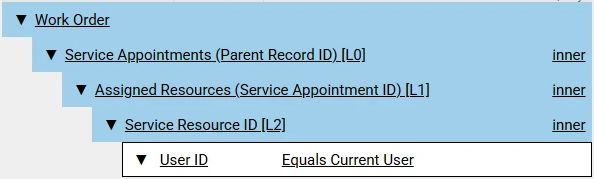
In Woodford Configuration, you can now enable the feature Support for deeply nested Parent->Child links in Sync and Online mode. When syncing and in online mode, Resco Mobile CRM will automatically split SOQL fetches with nested Parent->Child links into multiple queries. This allows more specific sync filters at the cost of some performance and a slight impact on API limits. See Deep dive: Sync filters in Field Service for details.
Salesforce API 66.0
Resco now supports Salesforce API 66.0 (Spring 2026). One notable change is that the Resco metadata import now supports the internal Salesforce type "long", which allows importing system fields containing large integers, such as ContentDocument.ContentSizeLong.
Generate questionnaires using AI
This feature is now available for Salesforce. In some environments, you must grant it extra permissions.
Woodford CLI enhancements
Authenticate using client ID and client secret
Woodford CLI now offers a new way to authenticate: In addition to the device authentication flow, you can use a client ID and client secret. This can be useful, for example, when you want to automate deploying the same app project to multiple customer environments.
Update project properties
In addition to create, publish, delete, export, and import, you can now also update project properties from the command line.
Set parent project from command line
When creating app projects using the command line, you can now set an additional property, the parent project.
Improved error reporting for workflow rules
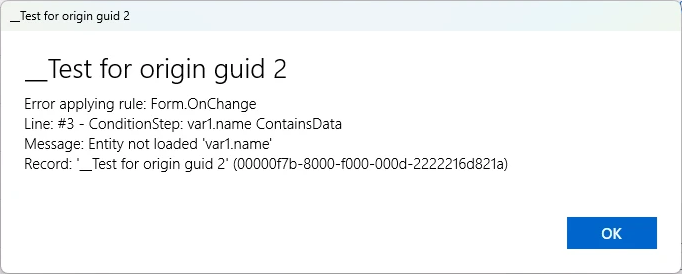
Error messages displayed while executing rules in the Resco Mobile CRM app (views, forms, questionnaires, route planner, calendar) now include detailed information about failures, including the step, line, record, and exception message, instead of generic messages or silent logging. Errors in row script and calendar rules are now surfaced to users (once per list refresh / calendar reload), reducing confusion and support requests. This change does not apply to deprecated components such as the web app and Schedule Board.
UI change: wider modal windows
On iOS and Android versions of Resco Mobile CRM, some modal windows did not make effective use of the available screen space, appearing as narrow columns even on larger devices such as tablets. With this release, modal windows such as the mobile report preview and merge form now take advantage of the available screen space, providing a better experience on larger screens.